
Overview & Architecture
Overview of deploying custom Linux containers to Azure App Service, image registry sources, ACR authentication options, and container lifecycle events.
Overview
Azure App Service on Linux provides a fully managed Platform-as-a-Service (PaaS) environment for hosting web applications. Instead of managing Virtual Machines, OS patching, or web server configurations, you package your code and runtime into a Docker container and hand it off to App Service for hosting, auto-scaling, and load balancing.
Visual Flow & Architecture
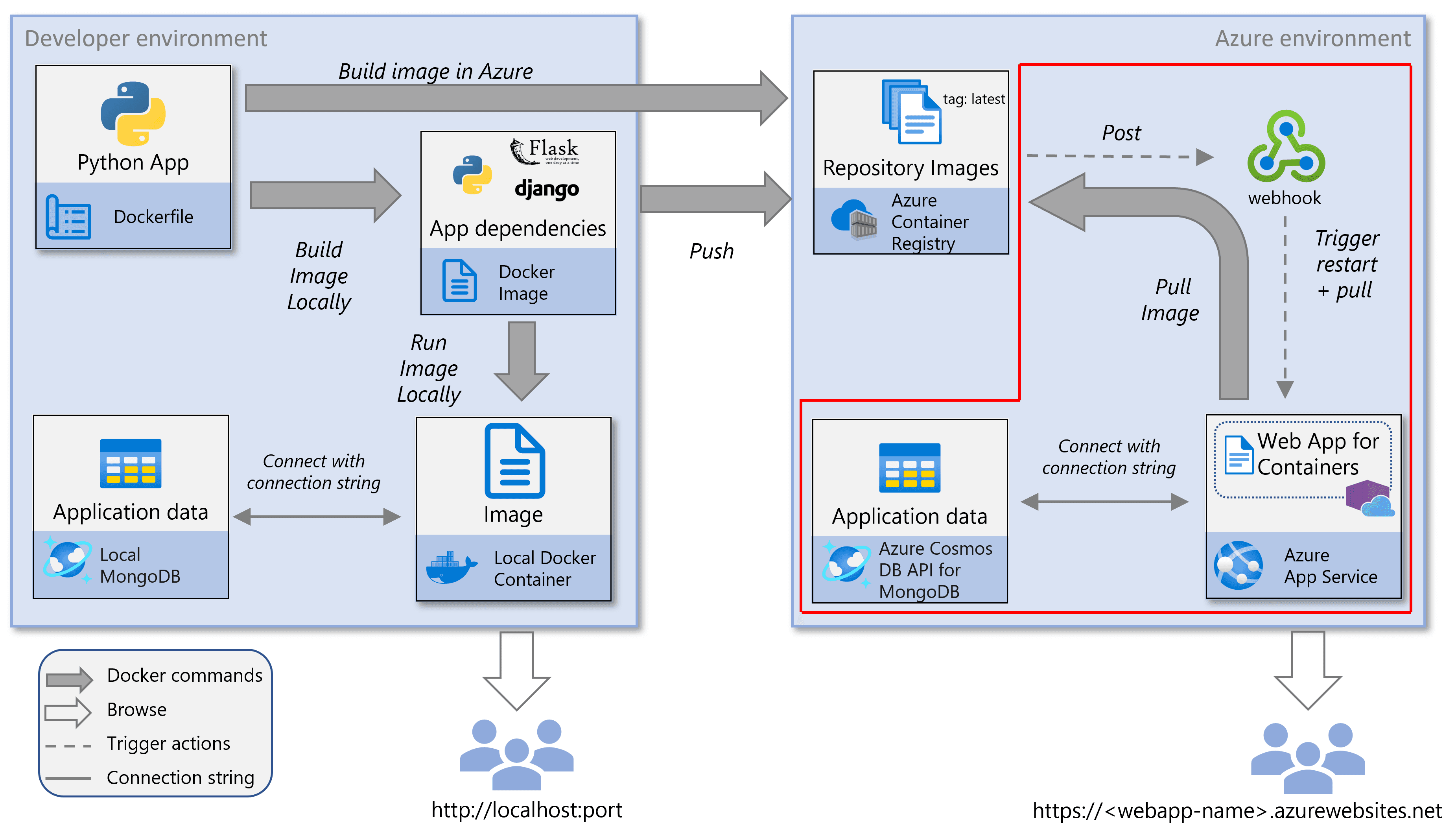
Key Concepts
1. Image Registry Sources
When spinning up a Web App for Containers, you specify where App Service pulls your container image:
- Azure Container Registry (ACR): Ideal for production. Integrates with Microsoft Entra ID (Azure AD), role-based access control (RBAC), managed identities, private networking, and vulnerability scanning.
- Public/Other Registries: Docker Hub (
index.docker.io), GitHub Container Registry (ghcr.io), or custom self-hosted registries.
2. ACR Authentication Mechanisms
App Service requires permission to pull images from your private registry:
- Managed Identity (Recommended Production Standard): Enables a System-Assigned Managed Identity on the Web App and grants it the
AcrPullRBAC role on ACR. Eliminates secret rotation and password leaks. - Admin Credentials (Simplest for Dev/Labs): Enable admin credentials directly on ACR to obtain an admin username and password.
3. Container Lifecycle & Image Pull Triggers
Understanding when App Service pulls container images prevents caching confusion:
- Initial Deployment: Pulls all image layers from ACR when the Web App starts.
- App Restart: Pulls only modified/updated layers (cached layers are reused).
- Scale Out: New instances pull the specified image tag.
- Pricing Tier Change: Moving to different hardware forces a fresh image pull.
- Continuous Deployment (CD Webhooks): Enabling CD generates a webhook URL. When a new image is pushed to ACR under the target tag (e.g.
:latest), ACR triggers App Service to pull the updated image automatically.
Sub-Modules in This Section
- 01 - Deployment Methods — VS Code GUI workflow and Azure CLI with Managed Identity (
AcrPull). - 02 - Runtime & App Settings — Container runtime behavior, port routing, persistent storage, and Key Vault secrets.
- 03 - Observability & Troubleshooting — Real-time log streaming, Kudu diagnostic console, SSH access, and production gotchas.
02 - ACR Tasks & CI/CD
Move from manual Docker builds to teaching Azure how to build, test, and deploy your code automatically with ACR Tasks.
01 - Deployment Methods
Learn how to deploy custom containers using VS Code Extensions (GUI) or Azure CLI with System-Assigned Managed Identity and AcrPull role assignments.