
01 - ACR Registries & Artifacts
Provision a secure Azure Container Registry, build a Python Inference API container, and securely push it to the cloud.
Visual Flow

Step-by-Step Lab Guide
0. Pre-flight Checks Before provisioning, check your current context and resource groups:
az account show -o table
az group list -o table
1. Create the Azure Container Registry Provision your secure cloud locker. Remember, the name must be strictly lowercase, alphanumeric, and globally unique!
az acr create --resource-group container-learning --name <your-unique-name> --sku Basic2. Authenticate your Local Docker Client Get the temporary token so Docker can talk to Azure securely. (Ensure Docker Desktop is running first!)
az acr login --name <your-unique-name>3. Build the Image
First, ensure you are in the correct directory. Then package your Python code. Don't forget the . at the end (the build context)!
cd labs/lab-01-acr-registries

# For Student/Free subscriptions (Local Build):
docker build -t <your-unique-name>.azurecr.io/inference-api:v1.0.0 .

# For Pay-As-You-Go/Enterprise (Cloud Build):
az acr build --registry <your-unique-name> --image inference-api:v1.0.0 .
4. Push to the Cloud (If you did a Local Build) Ship it to Azure!
docker push <your-unique-name>.azurecr.io/inference-api:v1.0.05. Verify the Artifact Confirm it is sitting safely in the registry.
az acr repository list --name <your-unique-name> -o tableAdvanced ACR Features (Exam Focus)
6. View Image Digests (Manifests)
A tag (v1.0.0) can easily be overwritten by a mistake, but a digest (SHA-256 hash) is immutable. This is critical for zero-trust security and compliance.
az acr manifest list-metadata --registry <your-unique-name> --name inference-api -o table7. Lock a Production Image Prevent accidental deletion or overwriting of a critical image (like a production release).
az acr repository update --name <your-unique-name> --image inference-api:v1.0.0 --write-enabled falseTo verify the lock is in place, run az acr repository show and look for "writeEnabled": false.
8. Cloud Testing (az acr run)
(Note: May fail on Student subscriptions with TasksOperationsNotAllowed just like az acr build did)
Instead of downloading the image to test it, tell Azure to spin it up and run a command inside it!
az acr run --registry <your-unique-name> --cmd "<your-unique-name>.azurecr.io/inference-api:v1.0.0 python -c 'import app'" /dev/nullThe Commands (Cheat Sheet)
| Command | What it does & Why it matters |
|---|---|
az group list -o table | Lists all resource groups. -o table prevents a massive JSON wall of text. Essential for exams/prod. |
az acr list -o table | Lists all registries across your subscription. |
az acr create -g <rg> -n <name> --sku Basic | Provisions the ACR. Basic is the cheapest tier. |
az acr login -n <name> | Bridges Azure Identity with your local Docker CLI so you can push/pull securely. |
az acr build -r <name> -t <image> . | Cloud Build: Sends code to Azure to build (bypassing local Docker). |
docker build -t <registry-url>/<image> . | Local Build: Builds locally. Must be prefixed with the ACR URL so Docker knows where to route the push. |
az acr repository list -n <name> -o table | Verifies the container image actually made it into the registry. |
az acr manifest list-metadata | Gets the exact SHA-256 immutable digest of an image. |
az acr repository update --write-enabled false | Locks an image to prevent overwriting/deletion. Highly tested on exams. |
az acr run | Spins up the container inside Azure to run a quick test command. |
The Errors We Hit (And Why)
The best way to learn is by breaking things. Here is exactly what went wrong during this lab and why (highly relevant for debugging in prod and the exam).
1. The Naming Errors
- Error:
argument error: Registry name must use only lowercase. - Error:
(AlreadyInUse) The registry DNS name acrlab.azurecr.io is already in use. - Why it happens: ACR names become public DNS URLs (
<name>.azurecr.io). Therefore, they must be strictly lowercase, alphanumeric, and globally unique across the entire planet.
2. The Docker Daemon Error
- Error:
Cannot connect to the Docker daemon at unix:///Users/.../docker.sock. - When: Running
az acr login. - Why it happens:
az acr logintries to inject a token into your local Docker client. If Docker Desktop is closed, the Azure CLI crashes because it has nowhere to put the token. Fix: Start Docker Desktop.
3. The Cloud Build Block (TasksOperationsNotAllowed)
- Error:
ACR Tasks requests for the registry acrlab06 and <subscription> are not permitted. - When: Running
az acr build. - Why it happens: Bad actors were abusing Azure Free/Student accounts to mine crypto using Azure's free build VMs. Microsoft blocked
az acr buildon Student subscriptions by default. - The Fix: Fallback to building locally (
docker build) and pushing (docker push).
4. The Missing Build Context
- Error:
'docker buildx build' requires 1 argument - When: Running
docker build -t acrlab06.azurecr.io/inference-api - Why it happens: You forgot the trailing
.at the end of the command. Docker needs to know where the Dockerfile is located. The.means "my current directory".
5. The VPN / Proxy Timeout (The Invisible Wall)
- Error:
proxyconnect tcp: dial tcp 192.168.65.1:3128: i/o timeout - When: Running
docker push, right at the very end. - Why it happens: The image built perfectly, but Docker Desktop's internal network gateway (
192.168.65.1) got confused or blocked by a VPN/Proxy on the host machine. - The Fix: Disconnect VPNs or simply restart Docker Desktop on your Mac.
Core Concepts (No Corporate Jargon)
1. The Tiers (What are you paying for?)
- Basic: What we used. Dirt cheap. Good for learning and side projects.
- Standard: More storage, faster upload/download speeds. Good for standard production apps.
- Premium: The Enterprise tier. You use this when you need Geo-replication (syncing images globally) and Private Endpoints (locking down the registry to your private corporate network).
2. The 3-Level Hierarchy
Think of ACR like a digital filing cabinet:
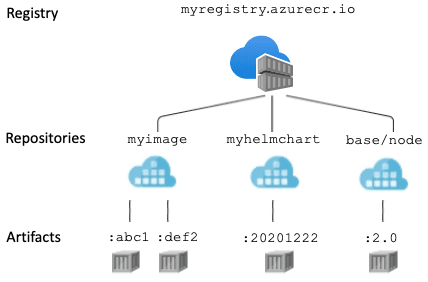
- Level 1: The Registry (The Filing Cabinet): The top-level resource you create (e.g.,
acrlab06). You control who has access to the entire cabinet here. - Level 2: The Repository (The Folders): Inside the registry, you group similar images into a repository (e.g.,
inference-api). Microsoft highly recommends using "namespaces" (forward slashes) to organize them for different teams, likeproduction/inference-apiandml-team/model-processor. - Level 3: The Artifact (The Files): The actual Docker image or Helm Chart sitting inside the repository.
3. The Anatomy of an Artifact
An artifact isn't just one file. It's made of three distinct pieces:
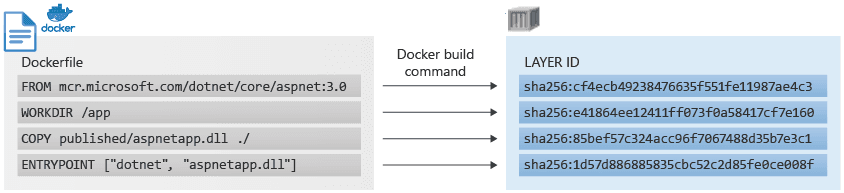
- Layers (The Building Blocks): Every line in your
Dockerfilecreates a layer. ACR deduplicates layers to save money. If 5 AI apps useFROM python:3.11-slim, Azure only stores it once and shares it across all 5 apps. - Tags (The Sticky Notes): Human-readable labels like
v1.2.0orlatest. Danger: Tags are mutable. You can easily accidentally overwrite a good tag with a broken image. - Manifests & Digests (The Immutable Truth): Azure generates a SHA-256 hash (Digest) for the image blueprint. Digests are mathematically immutable. You cannot fake or overwrite them.
4. How to Pull Images
- Method 1: Pull by Tag (Good for Dev):
docker pull acrlab06.azurecr.io/inference-api:v1.2.0. Easy to read, but risky if someone overwrites the tag. - Method 2: Pull by Digest (Mandatory for Strict Production):
docker pull acrlab06.azurecr.io/inference-api@sha256:0b83daf54a.... Zero-trust security. You are guaranteed to get the exact, untouched image that passed your QA testing.
Exam & Production Takeaways
- You don't need passwords for ACR. You should almost never enable the "Admin User" (which gives a static password). In prod, always use Azure AD / Entra ID (
az acr loginor Managed Identities). - Tokens expire. The token generated by
az acr loginonly lasts for 3 hours. If you leave your laptop and come back, you don't need toaz loginagain, but you will need toaz acr loginagain. - Tags are routing addresses. When you tag an image
acrlab06.azurecr.io/inference-api, you are explicitly telling the Docker client to ignore Docker Hub and route the traffic to your Azure registry.