
07 - Blue-Green Deployment
A practical guide to implementing Blue-Green deployments in Azure Container Apps using multiple revisions, labels, and traffic splitting.
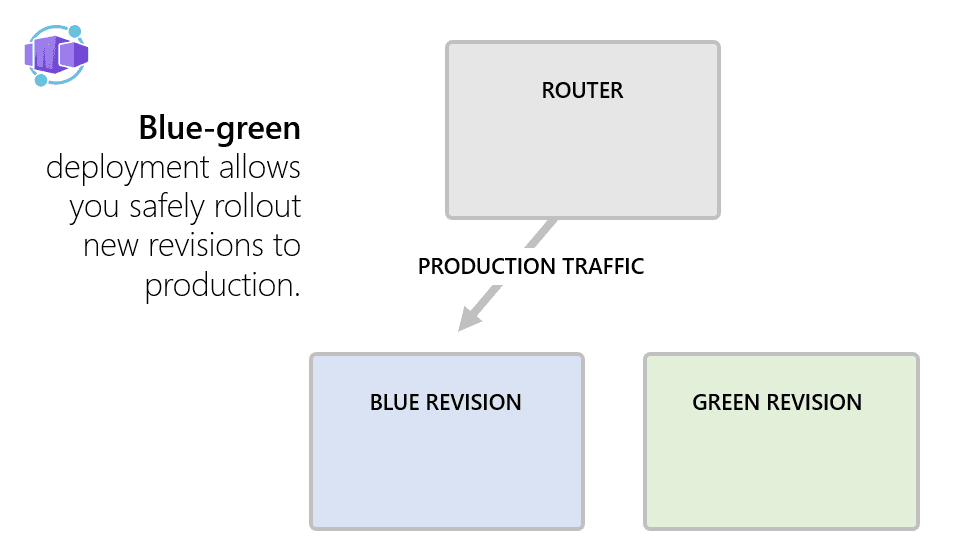
What is Blue-Green Deployment?
Blue-Green Deployment is a release strategy that practically eliminates downtime and significantly reduces risk. You run two identical environments side-by-side:
- Blue (Current Stable): This is the version currently serving 100% of your production traffic.
- Green (New Version): This is the new code. It is deployed and running, but it receives 0% of production traffic.
Once Green is deployed, you test it internally. If it passes, you flip the switch, routing 100% of traffic to Green. If anything breaks, you flip the switch back to Blue instantly. In the next release cycle, the roles reverse!
Step-by-Step Implementation in Azure Container Apps
This strategy relies entirely on Multiple Revision Mode, Traffic Weights, and Revision Labels.
Step 1: Deploy the "Blue" (Stable) Version
First, we create the app, enable multiple revisions, route 100% of traffic to it, and explicitly label it blue.
export APP_NAME="my-app"
export BLUE_COMMIT_ID="fb699ef"

# 1. Create the app in multiple revision mode
az containerapp create --name $APP_NAME \
  --environment $APP_ENVIRONMENT_NAME \
  --resource-group $RESOURCE_GROUP \
  --image mcr.microsoft.com/k8se/samples/test-app:$BLUE_COMMIT_ID \
  --revision-suffix $BLUE_COMMIT_ID \
  --revisions-mode multiple

# 2. Lock 100% of traffic to this revision
az containerapp ingress traffic set \
  --name $APP_NAME \
  --resource-group $RESOURCE_GROUP \
  --revision-weight $APP_NAME--$BLUE_COMMIT_ID=100

# 3. Apply the 'blue' label to it
az containerapp revision label add \
  --name $APP_NAME \
  --resource-group $RESOURCE_GROUP \
  --label blue \
  --revision $APP_NAME--$BLUE_COMMIT_ID
Step 2: Deploy the "Green" (New) Version
Now we deploy the new code. By default, it will not receive any traffic because we hardcoded the traffic to the Blue revision in the previous step. We just need to give it the green label.
export GREEN_COMMIT_ID="c6f1515"

# 1. Deploy the new revision
az containerapp update --name $APP_NAME \
  --resource-group $RESOURCE_GROUP \
  --image mcr.microsoft.com/k8se/samples/test-app:$GREEN_COMMIT_ID \
  --revision-suffix $GREEN_COMMIT_ID

# 2. Apply the 'green' label
az containerapp revision label add \
  --name $APP_NAME \
  --resource-group $RESOURCE_GROUP \
  --label green \
  --revision $APP_NAME--$GREEN_COMMIT_ID
Step 3: Test the Green Version Safely
The Green version is running, but real users can't see it. However, because we labeled it, Azure generates a unique URL just for testing!
# Get the base domain
export APP_DOMAIN=$(az containerapp env show -g $RESOURCE_GROUP -n $APP_ENVIRONMENT_NAME --query properties.defaultDomain -o tsv)

# Test Production (Hits Blue)
curl -s https://$APP_NAME.$APP_DOMAIN

# Test the New Code (Hits Green, bypassing traffic rules)
curl -s https://$APP_NAME---green.$APP_DOMAIN
Step 4: The Traffic Switch (Go Live)
If the Green URL looks good in testing, it's time to route production traffic to it. We do this by swapping the weights on the labels, not the specific revisions.
# Shift 100% of traffic to the green label
az containerapp ingress traffic set \
  --name $APP_NAME \
  --resource-group $RESOURCE_GROUP \
  --label-weight blue=0 green=100
Green is now live!
Step 5: Instant Rollback (If needed)
If users start complaining about bugs in the new version, you can instantly revert to the old code.
# Shift 100% of traffic back to the blue label
az containerapp ingress traffic set \
  --name $APP_NAME \
  --resource-group $RESOURCE_GROUP \
  --label-weight blue=100 green=0
Next Deployment Cycle
The beauty of this system is that it's cyclical. Right now, Green is stable and taking all traffic. Next week, when you have a new update, you will deploy it, label it Blue, test it on the Blue URL, and then swap the traffic back to Blue!